Bluetooth & Wi-Fi Pool Products: What They Do, Why They Matter, and How to Choose
Author: Brian Lane
Pool ownership is a lot more enjoyable when the “daily grind” is handled automatically—especially during peak season when you’re balancing swim time, maintenance, and energy costs. That’s where Bluetooth and Wi-Fi pool products come in. From remotely adjusting pump schedules to running a robotic cleaner while you’re away, connected pool gear can reduce hands-on work, help stabilize water quality, and improve energy efficiency.
If you’re exploring connected pool equipment, start here: ProPools’ Bluetooth & Wi-Fi Products category (smart and app-enabled pool gear in one place).
https://www.propools.com/category/bluetooth-and-wi-fi-products/83
https://www.propools.com/category/bluetooth-and-wi-fi-products/83
Bluetooth vs. Wi-Fi: What’s the Real Difference?
Bluetooth (short-range control)
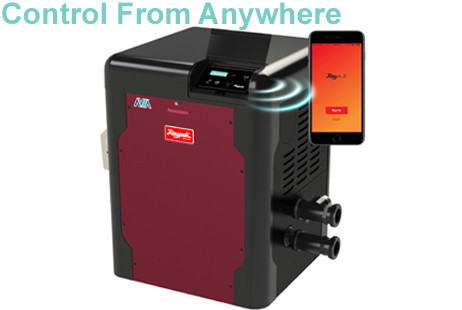
Bluetooth products typically connect directly to your phone or tablet when you’re nearby. They’re often simpler to set up, less dependent on home internet stability, and can be a great fit when:
- Your equipment pad is close to where you’ll be using the app
- You prefer straightforward setup without network configuration
- You mainly want “on-site convenience” rather than true remote access
Tradeoff: Bluetooth usually won’t give you true “control from anywhere” unless the device has an additional bridge or gateway.
Wi-Fi (anywhere access and automation)
Wi-Fi products connect to your home network so you can control or monitor your pool equipment remotely—often from anywhere you have cellular data. Wi-Fi tends to be ideal when:
- You want to adjust schedules, temperatures, or run times from work or travel
- You want alerts (e.g., temperature changes, system status notifications)
- You want integration with broader “smart home” routines
Tradeoff: Wi-Fi requires stable coverage to the equipment location. For some backyards, that may mean adding a mesh node or extender.
What Types of Pool Equipment Commonly Offer Connectivity?
Connected pool gear generally falls into a few practical categories. You don’t need all of them—just the ones that remove the most friction from your current routine.
1) Smart pump control and scheduling
Variable-speed pumps and controllers often benefit most from connectivity because schedule adjustments directly impact energy use.
Common advantages:
Common advantages:
- Fine-tune run times by season or bather load
- Reduce energy costs by optimizing speed and duration
- Make quick adjustments after storms or heavy use
Best for: Pool owners who want a quieter pool, more control over circulation, and fewer “manual schedule” tweaks.
2) Automation and control systems (the “hub” approach)
Automation systems coordinate multiple pieces of equipment—pump, heater,
lighting, sanitization, and water features—through a single app or interface.
Typical benefits:
Typical benefits:
- One “dashboard” for the entire pool system
- Coordinated schedules (e.g., heat only when circulation is running)
- Fewer compatibility headaches when components are designed to work together
Best for: Owners adding multiple upgrades, or anyone who wants central control rather than separate apps.
3) Smart sanitation and chlorination monitoring
Connectivity can help you keep sanitation more consistent, particularly when water conditions change quickly (heat waves, storms, heavy swimmer load).
App-enabled systems may provide:
App-enabled systems may provide:
- Status visibility and runtime adjustments
- Reminders and maintenance prompts
- More informed troubleshooting when something seems “off”
Best for: Owners who want fewer surprise water issues and more predictable chemistry management.
4) Connected robotic cleaners
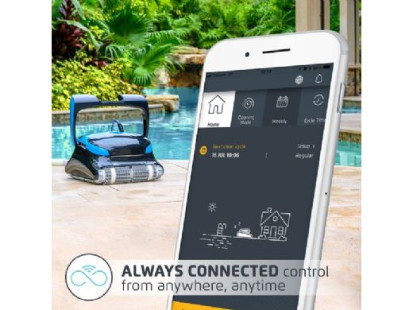
Robotic cleaners are already a time saver; app control can make them easier to live with:
- Start/stop cycles without walking outside
- Schedule cleanings on a routine
- Track cycle status and sometimes cleaning modes
Best for: Anyone who wants a consistently clean pool with minimal effort.
5) Smart pool lighting and scenes
App-controlled lights can add convenience and atmosphere:
- Set lighting scenes for parties or evening swims
- Use timers so lights shut off automatically
- Reduce wasted power from lights accidentally left on
Best for: Owners who use their pool at night or like the
“resort feel.”
Key Buying Criteria: What to Check Before You Commit
Network compatibility and signal strength
- Wi-Fi band: Many outdoor smart devices rely on 2.4 GHz Wi-Fi for better range (even if your router also supports 5 GHz).
- Equipment-pad coverage: If your equipment is far from the house, plan for a mesh node/extender rather than hoping the signal holds.
App usability and long-term support
The hardware matters, but the app experience is what you live with every day. Look for:
- Clear scheduling controls (not buried behind confusing menus)
- Reliable connectivity and easy re-pairing after router changes
- A vendor with a track record of updates and support
Integration: “one ecosystem” vs. “several devices”
If you’re adding more than one connected component, compatibility is a major factor.
- A unified system can be cleaner and easier to manage.
- Mixed devices can still work well, but you may be juggling multiple apps and duplicated schedules.
Installation and electrical considerations
Some connected equipment is plug-and-play; other items require professional installation, bonding, or code-compliant wiring—especially at the equipment pad. If you’re not sure, treat electrical and automation work as “pro territory” to avoid reliability and safety issues.
Cybersecurity and account hygiene
Smart pool products are connected devices—treat them like any smart home equipment:
- Use a strong, unique password for the device account
- Keep firmware updated when updates are available
Prefer reputable brands with consistent software support
A Practical Upgrade Path (So You Don’t Overbuy)
If you want the benefits without going “all-in” immediately, this sequence
usually delivers strong ROI:
- Start with automation/control or pump scheduling (largest impact on convenience and operating costs)
- Add a robotic cleaner if cleaning time is the pain point
- Add lighting for usability and enjoyment
- Expand into sanitation monitoring if you want a more hands-off chemistry routine
This approach avoids buying isolated smart gadgets that don’t meaningfully
reduce work.
Where to Shop: Connected Pool Gear in One Category
To browse a consolidated set of connected options, use ProPools’ Bluetooth
& Wi-Fi category page:
https://www.propools.com/category/bluetooth-and-wi-fi-products/83
https://www.propools.com/category/bluetooth-and-wi-fi-products/83
If you’re comparing multiple items, focus on signal reliability,
compatibility with your existing equipment (especially pump/heater/sanitizer),
and whether you want local convenience (Bluetooth) or true remote
access (Wi-Fi).